



The Direct Answer: How to Build Your First Workflow
To build an effective AI image workflow, you should use a visual node-based editor that treats each step—prompting, image generation, and enhancement—as an independent, configurable block. This approach allows you to chain a text/LLM prompt node directly into an image generation node, followed by an optional 4K enhancement node. By using app.relayme.ai, you can design these pipelines without writing code, effectively automating the repeatable parts of your design process.
This recommendation is best suited for marketing teams, designers, and e-commerce operators who need to produce image assets at scale. It is not recommended for users who require highly idiosyncratic, non-repeatable bespoke art that changes radically in every single iteration. For those needing consistent, brand-aligned visual output, building a workflow once and iterating on the prompts is the most efficient use of your time.
Connect inputs before running the workflow
Start with a text node containing the subject, required details, composition and output use. Connect it to an LLM node if you want to turn that brief into a reusable image prompt.
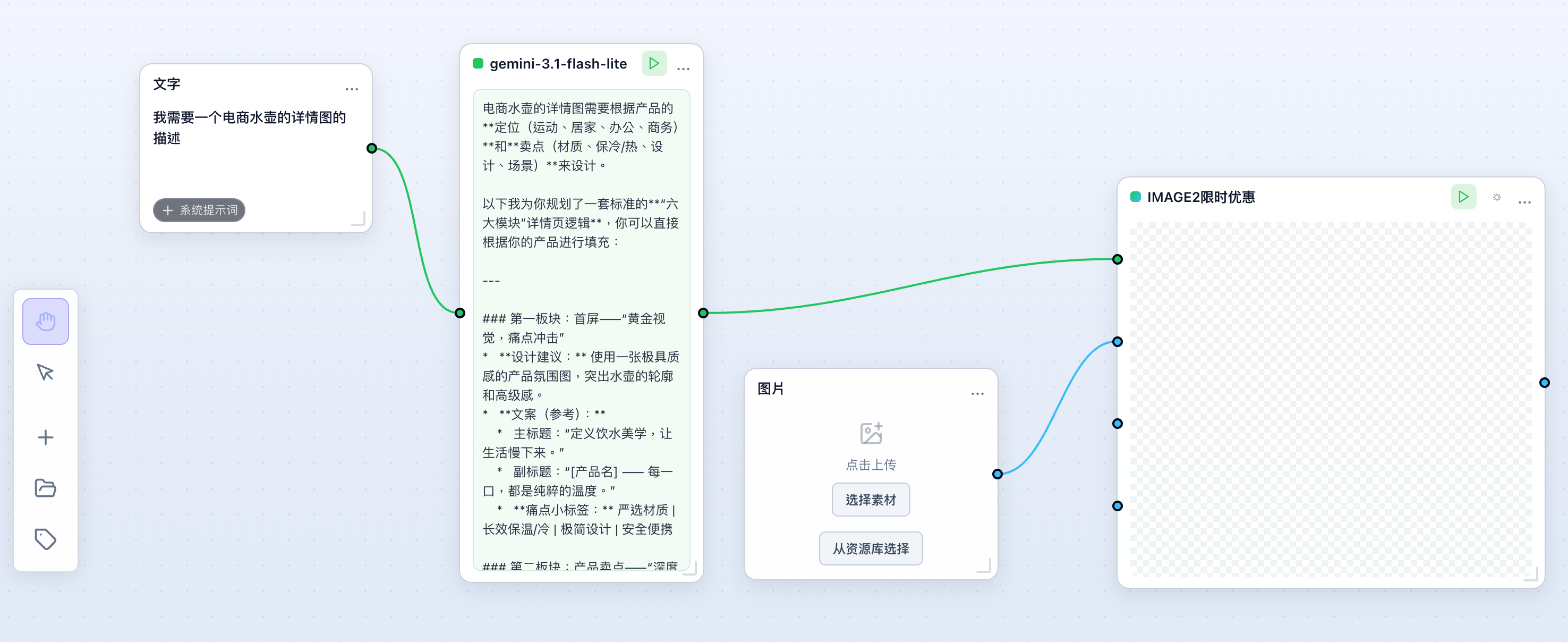
Connect the resulting text to the image model’s prompt input. When using a reference photo, connect an image input to a supported reference port as well; a text description alone does not supply the original product image.
Inspect the model, resolution and expected credits in the workspace. Run a small task, inspect the output, then reuse the structure with another input. The screenshot shows an existing node connection, not a new image-quality benchmark.
Reusable prompt template (copy it into the text node and change only the bracketed fields): “[Subject and product name]. Keep: [details that must not change, such as label text, color, shape]. Scene: [setting and lighting]. Composition: [camera angle, framing, empty space for copy]. Output: [use, such as listing image or banner], [aspect ratio].” Save the workflow once it produces an approved image; next time, edit the brackets and run it again.
Visualizing Your Pipeline with Node-Based Editing
In a visual workflow builder, you start by defining an LLM node where you craft your prompt using the available Gemini text model. This text node feeds directly into image nodes like Nano Banana, Nano Banana Pro, or GPT-Image2. This separation ensures that your logic remains distinct from your image asset generation, making it easy to swap out the underlying technology if a different model better suits your specific style or artistic requirement.
Once the nodes are connected, you can trigger a parallel 'fan-out' process. This means a single input prompt can be sent to multiple image models simultaneously. Instead of testing one model at a time, you can view the results side-by-side in your task list. This allows you to objectively compare how different models handle the same creative prompt before committing your credits to a final, high-resolution 4K export.
For the exact node connections and a reusable instruction, follow the LLM prompt workflow tutorial.
Managing Costs and Credit Consumption
Task history records the credit spend of each generation. As checked on 20 September 2026, the public model catalogue lists the GPT-Image2 special-offer channel at US$0.10 per image for 1K, 2K and 4K; the standard channel has separate resolution prices. Video costs also vary by duration, resolution and audio options. Check the current pricing table before running a batch, and budget for retries and human review separately.
For teams just getting started, RelayMe offers a 'free to start' option with no credit card required. As your requirements grow, you can choose from tiered plans: the Starter plan ($19/month for 20,000 credits), the Basic plan ($32/month for 35,000 credits), or the Pro plan ($90/month for 110,000 credits). Annual billing discounts these rates. Note the expiry rules: monthly plan credits are valid for the current period and reset on each billing date, while pay-as-you-go top-up credits never expire — so keep routine volume on a plan and cover bursts with top-ups.
Check the current pricing and credit rules before selecting a model; a dated example is not a current quote.
Creating Reusable Assets and Templates
The true power of an image workflow builder lies in its reusability. Once you have perfected a sequence—perhaps a prompt that produces consistent product photography for an e-commerce catalog—you can save it as a custom workflow template. This library of templates allows your team to maintain visual consistency across different marketing campaigns without having to manually re-configure the node chain every time.
By saving your successful configurations, you turn a complex creative process into a standardized 'one-click' utility. When a new product arrives, you simply update the input prompt, select the pre-configured workflow from your template library, and run the task. This minimizes manual effort and ensures that the quality of your images remains high and predictable throughout the production lifecycle.
Compare Nano Banana Pro and GPT Image 2 for model settings and credits before choosing a model for your own workflow.
For every node type available today, and what a node-based workflow on RelayMe does not cover, see the node-based AI workflow overview.
What to Avoid: The 'Single-Model' Trap
A common mistake for teams new to AI workflows is relying on a single model for every single creative task. Even if one model works well for abstract concepts, it might underperform for photo-realistic product shots. Sticking to one model limits your creative flexibility and prevents you from benefiting from the unique strengths of different providers like Veo 3.1, Veo 3.1 Fast or MiniMax-H3 for video, or specialized image models for still assets.
If your workflow does not involve comparing at least two different model outputs for your critical assets, you are likely leaving potential quality on the table. Use the parallel node capabilities of the workflow builder to test diverse models against your prompt. This comparison-driven approach, rather than a single-model approach, is the most robust way to guarantee the visual standard of your final output.